
Λογαριασμός Επικοινωνία
Το καλάθι σας
Αποστολή με DPD & FedEx
Βοήθεια; Ρωτήστε το AI

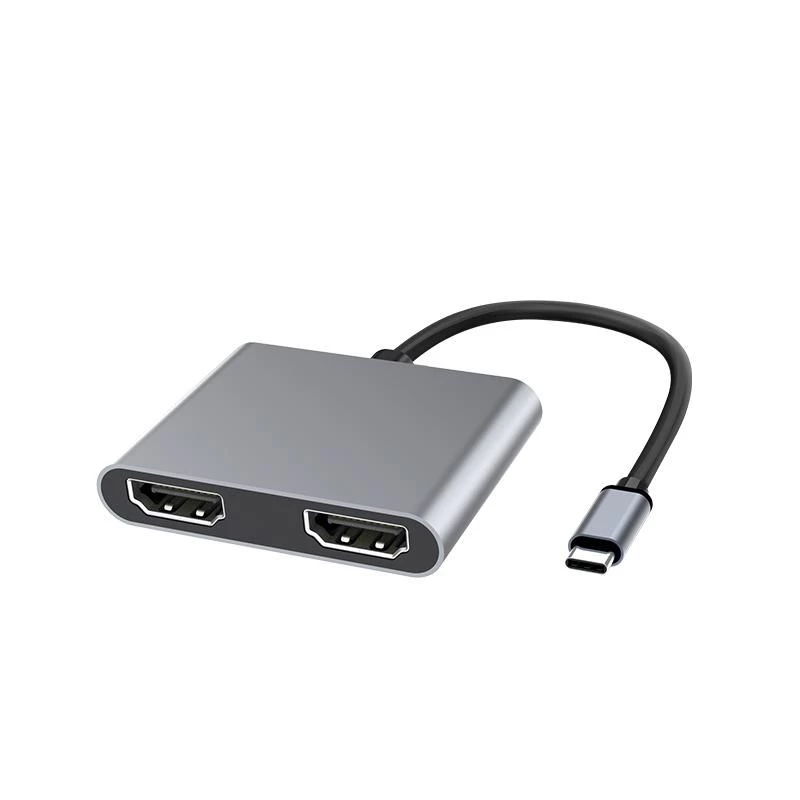
Microconnect USB3.1CHDMIX2 Προσαρμογέας γραφικών USB Μαύρο

Microconnect USB3.1CHDMIX2 Προσαρμογέας γραφικών USB Μαύρο
36,49 €
The MicroConnect USB3.1CHDMIX2 is a Type-C to dual HDMI adapter that lets you connect a USB-C source to two high-definition HDMI displays such as TVs or projectors. The compact black adapter supports both SST (Single-Stream Transport) and MST (Multi-Stream Transport) modes, enabling either mirrored ... Περισσότερα
Απόθεμα 190 Κωδικός 1188737 Μάρκα MICROCONNECT Μοντέλο USB3.1CHDMIX2 Εγγύηση 2 χρόνια

Αποστολή & επιστροφές

Εκτιμώμενη παράδοση Πέμπτη, Οκτωβρίου 22
Θα ενημερώνεστε μέσω του αναλυτικού μας συστήματος παρακολούθησης
Τρόποι πληρωμής
Τραπεζική κάρταVisaMastercardPayPalApple PayGoogle PayΤραπεζική κατάθεση

The MicroConnect USB3.1CHDMIX2 is a Type-C to dual HDMI adapter that lets you connect a USB-C source to two high-definition HDMI displays such as TVs or projectors. The compact black adapter supports both SST (Single-Stream Transport) and MST (Multi-Stream Transport) modes, enabling either mirrored output on two monitors or independent images on each screen. It is compatible with devices that support USB-C video output, including MacBook and Chrome OS devices like the Chromebook Pixel.

Advantages

The adapter provides straightforward expansion of display capability from a single USB-C port to two HDMI displays without requiring a full docking station. Its support for SST and MST gives flexibility to use mirrored or extended desktops. The unit is compact and lightweight, making it easy to carry and integrate into mobile or desktop setups.

Suitable for

  • Extending a laptop display to two external monitors for multitasking
  • Mirroring video output to two HDMI TVs or projectors for presentations
  • Using with MacBook, Chromebook Pixel and other USB-C devices with DisplayPort Alt Mode

Key specifications

  • Model: MicroConnect USB3.1CHDMIX2
  • Interface: USB Type-C (input) to 2× HDMI (output)
  • Modes supported: SST and MST
  • Colour: Black
  • Dimensions: 54 mm (W) × 15.5 mm (D) × 66 mm (H)
  • Weight: 0.08 kg
  • Package: 1 unit

How to use

Connect the adapter's USB-C connector to a compatible device with USB-C video output (DisplayPort Alt Mode). Attach up to two HDMI cables from the adapter to the HDMI inputs of your displays. Configure display settings on your computer to choose mirrored (SST) or extended (MST) mode as required. Ensure both displays are powered on and set to the correct HDMI input.

Recommendations

For best results, use HDMI cables rated for the resolution you need and verify your device supports DisplayPort Alt Mode over USB-C. If the second display is not detected, check the host device's display output settings and try restarting the system after reconnecting the adapter.
Κύρια σημεία
  • Extending a laptop display to two external monitors for multitasking
  • Mirroring video output to two HDMI TVs or projectors for presentations
  • Using with MacBook, Chromebook Pixel and other USB-C devices with DisplayPort Alt Mode
  • Model: MicroConnect USB3.1CHDMIX2
  • Interface: USB Type-C (input) to 2× HDMI (output)
  • Modes supported: SST and MST
  • Colour: Black
  • Dimensions: 54 mm (W) × 15.5 mm (D) × 66 mm (H)
  • Weight: 0.08 kg
  • Package: 1 unit
Χαρακτηριστικά
Βάθος
15.5 mm
Βάθος συσκευασίας
161 mm
Βάρος
31 g
Βάρος συσκευασίας
82 g
Κωδικός Εναρμονισμένου Συστήματος (HS)
84733020
Πλάτος
54 mm
Πλάτος συσκευασίας
278 mm
Ποσότητα ανά συσκευασία
1 pc(s)
Ύψος
66 mm
Ύψος συσκευασίας
18 mm
Χρώμα προϊόντος
Black
Ιστορικό τιμών τους τελευταίους 6 μήνες
Microconnect USB3.1CHDMIX2 Προσαρμογέας γραφικών USB Μαύρο
Τρέχουσα
36,49 €
Χαμηλότερη
35,71 €
Υψηλότερη
38,54 €
Μεταβολή 24 ωρών
+0,58 €   +2%
Εβδομάδα
+0,27 €   +1%
Μήνας
+0,45 €   +1%

Δημοφιλή προϊόντα σε αυτή την κατηγορία

Γεια σας, είμαι ο βοηθός AI του DistriNode. Μπορώ να σας βοηθήσω να βρείτε προϊόντα, να συγκρίνετε επιλογές, να δημιουργήσετε PDF προσφορών ή να ανοίξετε αιτήματα υποστήριξης.