
Λογαριασμός Επικοινωνία
Το καλάθι σας
Αποστολή με DPD & FedEx
Βοήθεια; Ρωτήστε το AI

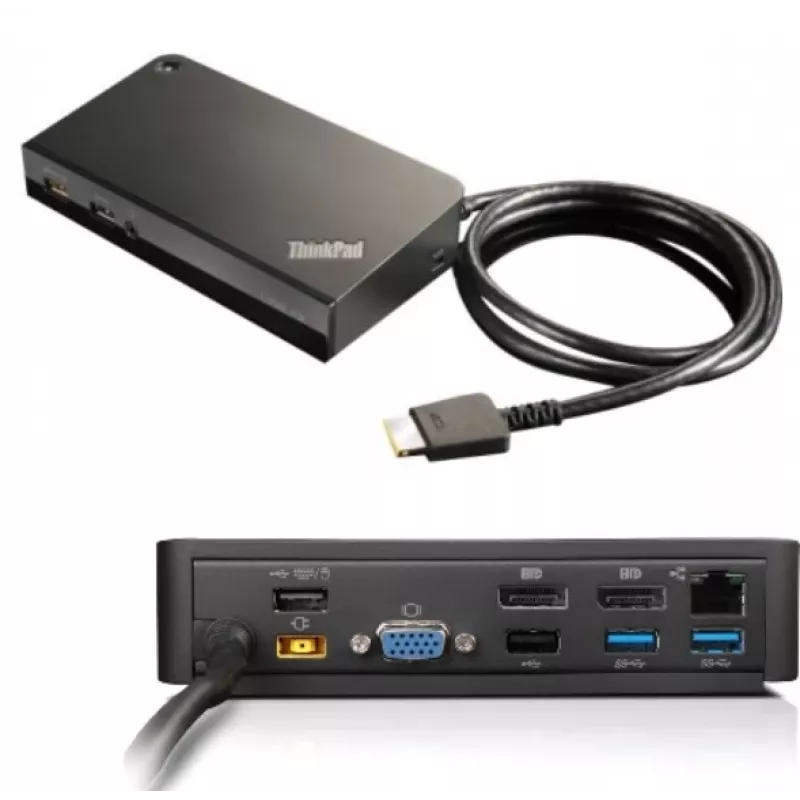
Lenovo 03X6300 Σταθμός σύνδεσης/Αντιγραφέας θυρών Laptop Ενσύρματος OneLink+ Μαύρο

Lenovo 03X6300 Σταθμός σύνδεσης/Αντιγραφέας θυρών Laptop Ενσύρματος OneLink+ Μαύρο
217,83 €
The Lenovo 03X6300 Docking Station provides a compact wired expansion hub for laptops equipped with the OneLink+ interface. Designed to increase desktop connectivity, this black docking station delivers multiple USB ports, a Gigabit Ethernet RJ-45 socket and a VGA output for connecting external disp... Περισσότερα
Απόθεμα 2 Κωδικός 1167144 Μάρκα LENOVO Μοντέλο 03X6300 Εγγύηση 2 χρόνια

Αποστολή & επιστροφές

Εκτιμώμενη παράδοση Παρασκευή, 30 Οκτωβρίου
Θα ενημερώνεστε μέσω του αναλυτικού μας συστήματος παρακολούθησης
Τρόποι πληρωμής
Τραπεζική κάρταVisaMastercardPayPalApple PayGoogle PayΤραπεζική κατάθεση

The Lenovo 03X6300 Docking Station provides a compact wired expansion hub for laptops equipped with the OneLink+ interface. Designed to increase desktop connectivity, this black docking station delivers multiple USB ports, a Gigabit Ethernet RJ-45 socket and a VGA output for connecting external displays. A 3.5 mm audio jack supports headphones or external speakers, making the dock suitable for common office and home workstation setups.

Advantages

The docking station consolidates wired connectivity into a single unit to reduce cable clutter and simplify device connections. With four USB 3.2 Gen 1 Type-A ports and two USB 2.0 ports, it supports simultaneous connection of high-speed peripherals and legacy devices. The integrated Gigabit Ethernet port ensures reliable wired network performance at 10/100/1000 Mbit/s, while the VGA output allows connection to older monitors or projectors. Its compact black housing provides a discreet footprint that fits on crowded desks.

Suitable for

  • Expanding laptop connectivity in office and remote work environments
  • Connecting multiple USB peripherals such as external drives, keyboards and mice
  • Establishing stable wired network access for video calls and large file transfers
  • Using legacy VGA displays or projectors alongside modern laptop hardware
  • Setting up a simple workstation with external audio via the 3.5 mm jack

Key specifications

  • Interface: OneLink+ (wired docking connection)
  • USB ports: 4 × USB 3.2 Gen 1 (Type-A), 2 × USB 2.0
  • Network: 1 × Gigabit Ethernet (RJ-45), 10/100/1000 Mbit/s
  • Video output: 1 × VGA (D-Sub)
  • Audio: 3.5 mm headphone jack
  • Colour: Black

How to use

Connect the docking station to a compatible laptop using the OneLink+ connector. After attaching the dock, plug external devices into the available USB ports and connect a wired network cable to the RJ-45 port if required. Attach a VGA cable to an external monitor or projector and connect headphones or speakers to the 3.5 mm jack. Most operating systems will automatically detect connected USB devices and the Ethernet interface; install any device drivers if prompted by the system for full functionality.

Recommendations

Place the docking station on a stable, flat surface near your laptop and router for easy cable routing. Use the USB 3.2 Gen 1 ports for high-bandwidth peripherals (external SSDs, webcams) and reserve USB 2.0 ports for keyboards, mice or low-speed accessories. For optimal network performance, use a quality Cat5e or Cat6 Ethernet cable and avoid long, damaged cables. If the system requests drivers after first connection, follow the laptop manufacturer's guidance to install the correct OneLink+ or docking drivers.

Κύρια σημεία
  • Expanding laptop connectivity in office and remote work environments
  • Connecting multiple USB peripherals such as external drives, keyboards and mice
  • Establishing stable wired network access for video calls and large file transfers
  • Using legacy VGA displays or projectors alongside modern laptop hardware
  • Setting up a simple workstation with external audio via the 3.5 mm jack
  • Interface: OneLink+ (wired docking connection)
  • USB ports: 4 × USB 3.2 Gen 1 (Type-A), 2 × USB 2.0
  • Network: 1 × Gigabit Ethernet (RJ-45), 10/100/1000 Mbit/s
  • Video output: 1 × VGA (D-Sub)
  • Audio: 3.5 mm headphone jack
  • Colour: Black
Χαρακτηριστικά
Ethernet LAN
Yes
Αριθμός θυρών DisplayPort
2
Αριθμός θυρών HDMI
0
Αριθμός θυρών USB 2.0
2
Αριθμός θυρών USB 3.2 Gen 1 (3.1 Gen 1) Type-A
4
Αριθμός θυρών VGA (D-Sub)
1
Διεπαφή host
OneLink+
Είσοδος μικροφώνου
No
Ενσωματωμένος καρταναγνώστης
No
Έξοδοι ακουστικών
0
Θύρες Ethernet LAN (RJ-45)
1
Συνδυασμένη θύρα ακουστικών/μικροφώνου
Yes
Ταχύτητες δεδομένων Ethernet LAN
10,100,1000 Mbit/s
Τεχνολογία συνδεσιμότητας
Wired
Υποδοχή ακουστικών
3.5 mm
Υποδοχή κλειδαριάς καλωδίου
Yes
Χρώμα προϊόντος
Black
Ιστορικό τιμών τους τελευταίους 6 μήνες
Lenovo 03X6300 Σταθμός σύνδεσης/Αντιγραφέας θυρών Laptop Ενσύρματος OneLink+ Μαύρο
Τρέχουσα
217,83 €
Χαμηλότερη
217,19 €
Υψηλότερη
231,58 €
Μεταβολή 24 ωρών
+0,00 €   +0%
Εβδομάδα
-10,58 €   -5%
Μήνας
-12,08 €   -5%

Γράψτε μια αξιολόγηση

Βαθμολογία *
Το όνομά σας θα εμφανίζεται δημόσια – μπορείτε να χρησιμοποιήσετε ψευδώνυμο. Προσκαλούμε τους αγοραστές να γράφουν αξιολογήσεις. Τις ελέγχουμε πριν από τη δημοσίευση και δημοσιεύουμε επίσης τις αρνητικές.

Κριτικές ειδικών

Ανεξάρτητες αξιολογήσεις από μέσα ενημέρωσης τεχνολογίας

pcmag.comBrian
8/10

Συμπέρασμα: The OneLink Pro Dock works with several Lenovo-branded laptops, and provides USB, Ethernet, DisplayPort, and DVI connectivity...

Πλεονεκτήματα
  • Simple connectivity with OneLink cable. Adds lots of ports. Supports dual-monitor use
Μειονεκτήματα
  • OneLink cable is not user-replaceable
Διαβάστε την πλήρη αξιολόγηση στο pcmag.com →

Δημοφιλή προϊόντα σε αυτή την κατηγορία

Πωλητής: UAB KUR LT · Laisvės pr. 125A, LT-06118 Βίλνιους, Λιθουανία · Κωδικός εταιρείας 303192950 · ΑΦΜ/ΦΠΑ ΕΕ LT100008198612 · Αποστολή από την ΕΕ (Λιθουανία)
Γεια σας, είμαι ο βοηθός AI του DistriNode. Μπορώ να σας βοηθήσω να βρείτε προϊόντα, να συγκρίνετε επιλογές, να δημιουργήσετε PDF προσφορών ή να ανοίξετε αιτήματα υποστήριξης.
Όλες οι κατηγορίες