
Λογαριασμός Επικοινωνία
Το καλάθι σας
Αποστολή με DPD & FedEx
Βοήθεια; Ρωτήστε το AI

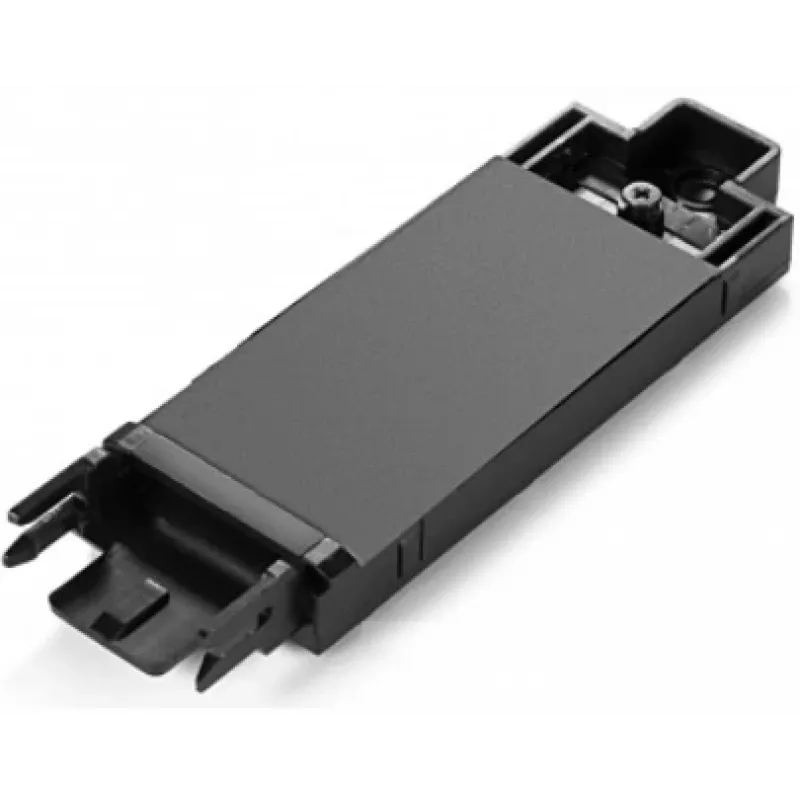
Lenovo 00UR868 Πλαίσιο τοποθέτησης SSD

Lenovo 00UR868 Πλαίσιο τοποθέτησης SSD
86,03 €
The ThinkPad P50 M.2 SATA SSD tray (Lenovo 00UR868) is a dedicated mounting bracket designed to install an M.2 SATA SSD into ThinkPad P50 workstations. The tray provides a secure mechanical interface for the drive and aligns the M.2 module with the laptop's internal connector to ensure correct fit a... Περισσότερα
Απόθεμα 1 Κωδικός 2406255 Μάρκα LENOVO Μοντέλο FRU00UR868 Εγγύηση 2 χρόνια

Αποστολή & επιστροφές

Εκτιμώμενη παράδοση Τρίτη, Οκτωβρίου 27
Θα ενημερώνεστε μέσω του αναλυτικού μας συστήματος παρακολούθησης
Τρόποι πληρωμής
Τραπεζική κάρταVisaMastercardPayPalApple PayGoogle PayΤραπεζική κατάθεση

The ThinkPad P50 M.2 SATA SSD tray (Lenovo 00UR868) is a dedicated mounting bracket designed to install an M.2 SATA SSD into ThinkPad P50 workstations. The tray provides a secure mechanical interface for the drive and aligns the M.2 module with the laptop's internal connector to ensure correct fit and reliable operation.

Advantages

The tray offers precise alignment and stable fixation for M.2 SATA SSDs in the ThinkPad P50 chassis, reducing the risk of poor connection or mechanical stress. Its form factor matches the original Lenovo mounting points, enabling straightforward replacement or upgrade without chassis modification.

Suitable for

  • Installing or replacing an M.2 SATA SSD in a Lenovo ThinkPad P50
  • Upgrading internal storage capacity of ThinkPad P50 workstations
  • Repair or maintenance tasks that require secure SSD mounting

Key specifications

  • Compatible drive type: M.2 SATA SSD (keying and size must match laptop requirements)
  • Target models: Lenovo ThinkPad P50 series
  • Material and finish: metal/plastic bracket designed for laptop internal mounting
  • Mounting: aligns M.2 module with onboard M.2 connector and secures with screw(s)

How to use

Power off the ThinkPad P50, disconnect any power sources and remove the service cover according to the laptop maintenance manual. Place the M.2 SATA SSD into the tray aligning the module with the connector and secure it with the appropriate screw(s). Reinstall the tray and service cover, then power on the system to verify the drive is detected and initialized in the operating system.

Recommendations

Use this tray only with compatible ThinkPad P50 systems and M.2 SATA SSD modules. Follow Lenovo service instructions for safe installation, handle the SSD and tray with anti-static precautions, and verify drive compatibility and BIOS settings after installation.
Κύρια σημεία
  • Installing or replacing an M.2 SATA SSD in a Lenovo ThinkPad P50
  • Upgrading internal storage capacity of ThinkPad P50 workstations
  • Repair or maintenance tasks that require secure SSD mounting
  • Compatible drive type: M.2 SATA SSD (keying and size must match laptop requirements)
  • Target models: Lenovo ThinkPad P50 series
  • Material and finish: metal/plastic bracket designed for laptop internal mounting
  • Mounting: aligns M.2 module with onboard M.2 connector and secures with screw(s)
Χαρακτηριστικά
Ποσότητα ανά συσκευασία
1 pc(s)
Συμβατότητα
ThinkPad P50
Συμβατότητα με μάρκες
Lenovo
Τύπος
SSD tray
Χρώμα προϊόντος
Black
Ιστορικό τιμών τους τελευταίους 6 μήνες
Lenovo 00UR868 Πλαίσιο τοποθέτησης SSD
Τρέχουσα
86,03 €
Χαμηλότερη
85,10 €
Υψηλότερη
86,03 €
Μεταβολή 24 ωρών
—   
Εβδομάδα
—   
Μήνας
—   

Δημοφιλή προϊόντα σε αυτή την κατηγορία

Πωλητής: UAB KUR LT · Laisvės pr. 125A, LT-06118 Βίλνιους, Λιθουανία · Κωδικός εταιρείας 303192950 · ΑΦΜ/ΦΠΑ ΕΕ LT100008198612 · Αποστολή από την ΕΕ (Λιθουανία)
Γεια σας, είμαι ο βοηθός AI του DistriNode. Μπορώ να σας βοηθήσω να βρείτε προϊόντα, να συγκρίνετε επιλογές, να δημιουργήσετε PDF προσφορών ή να ανοίξετε αιτήματα υποστήριξης.