
Λογαριασμός Επικοινωνία
Το καλάθι σας
Αποστολή με DPD & FedEx
Βοήθεια; Ρωτήστε το AI

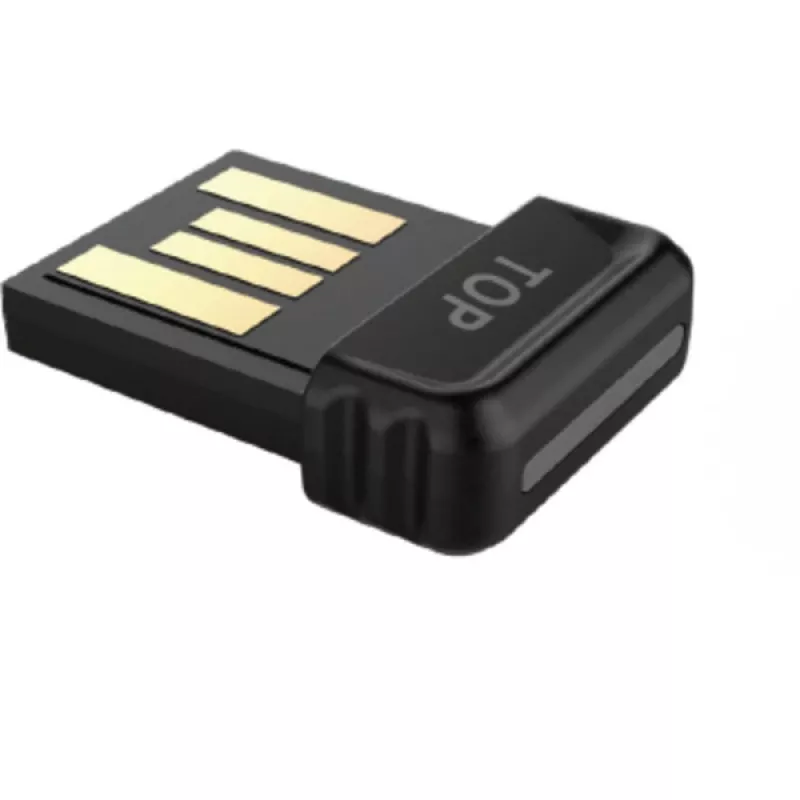
Dongle Yealink BT51-A Μαύρο

Dongle Yealink BT51-A Μαύρο
27,69 €
The Yealink BT51-A Black is a compact Bluetooth dongle developed to provide wireless connectivity between Yealink phones and compatible Bluetooth headsets or accessories. Designed in a black finish, the dongle enables straightforward pairing and maintains a stable connection for audio and hands-free... Περισσότερα
Απόθεμα 3 Κωδικός 118421 Μάρκα Yealink Μοντέλο 1300007 Εγγύηση 2 χρόνια

Αποστολή & επιστροφές

Εκτιμώμενη παράδοση Τρίτη, Οκτωβρίου 20
Θα ενημερώνεστε μέσω του αναλυτικού μας συστήματος παρακολούθησης
Τρόποι πληρωμής
Τραπεζική κάρταVisaMastercardPayPalApple PayGoogle PayΤραπεζική κατάθεση

The Yealink BT51-A Black is a compact Bluetooth dongle developed to provide wireless connectivity between Yealink phones and compatible Bluetooth headsets or accessories. Designed in a black finish, the dongle enables straightforward pairing and maintains a stable connection for audio and hands-free communication. It integrates with supported Yealink devices to extend mobility and simplify setup without adding visible complexity to a workspace.

Advantages

The dongle delivers consistent Bluetooth pairing and stable audio transmission while occupying minimal physical space. Its black housing blends with office equipment, and the plug-and-play nature reduces configuration time. The device focuses on reliable wireless communication and interoperability with Yealink endpoints, supporting clearer calls and an uncluttered desk setup.

Suitable for

  • Office users who need wireless headset connectivity with Yealink desk phones
  • Contact center environments requiring quick headset swaps and reliable links
  • Home office setups where a compact Bluetooth adapter is preferred

Key specifications

  • Form factor: compact USB dongle
  • Color: black
  • Primary function: Bluetooth wireless connectivity for audio accessories
  • Compatibility: designed for integration with supported Yealink communication devices
  • Connection type: USB interface for direct attachment to host device

How to use

Insert the dongle into an available USB port on a supported Yealink device. Follow the device prompts or the Yealink device interface to initiate Bluetooth pairing mode, then set your Bluetooth headset or accessory into pairing mode and complete the connection. Once paired, manage audio and call settings through the host device’s user interface as required. If the host device prompts for firmware updates or setting adjustments, follow the on-screen guidance to ensure optimal operation.

Recommendations

Place the dongle in a USB port with a clear line of sight to the headset for best wireless performance. Keep the dongle and paired accessories within recommended Bluetooth range and avoid placing large metal objects directly between devices to minimize interference.

Κύρια σημεία
  • Office users who need wireless headset connectivity with Yealink desk phones
  • Contact center environments requiring quick headset swaps and reliable links
  • Home office setups where a compact Bluetooth adapter is preferred
  • Form factor: compact USB dongle
  • Color: black
  • Primary function: Bluetooth wireless connectivity for audio accessories
  • Compatibility: designed for integration with supported Yealink communication devices
  • Connection type: USB interface for direct attachment to host device
Χαρακτηριστικά
Bluetooth
Yes
Εμβέλεια Bluetooth
30 m
Προφίλ Bluetooth
A2DP, AVRCP, HFP, HSP
Συμβατότητα
BH76, BH72
Συμβατότητα με μάρκες
Yealink
Τύπος προϊόντος
Dongle
Τύπος υποδοχής USB
USB Type-A
Χρώμα προϊόντος
Black
Ιστορικό τιμών τους τελευταίους 6 μήνες
Dongle Yealink BT51-A Μαύρο
Τρέχουσα
27,69 €
Χαμηλότερη
26,60 €
Υψηλότερη
27,98 €
Μεταβολή 24 ωρών
+0,41 €   +2%
Εβδομάδα
+0,18 €   +1%
Μήνας
+0,32 €   +1%

Δημοφιλή προϊόντα σε αυτή την κατηγορία

Γεια σας, είμαι ο βοηθός AI του DistriNode. Μπορώ να σας βοηθήσω να βρείτε προϊόντα, να συγκρίνετε επιλογές, να δημιουργήσετε PDF προσφορών ή να ανοίξετε αιτήματα υποστήριξης.