
Λογαριασμός Επικοινωνία
Το καλάθι σας
Αποστολή με DPD & FedEx
Βοήθεια; Ρωτήστε το AI

Διαχωριστής βίντεο HDMI DeLOCK 18684

Διαχωριστής βίντεο HDMI DeLOCK 18684
76,90 €
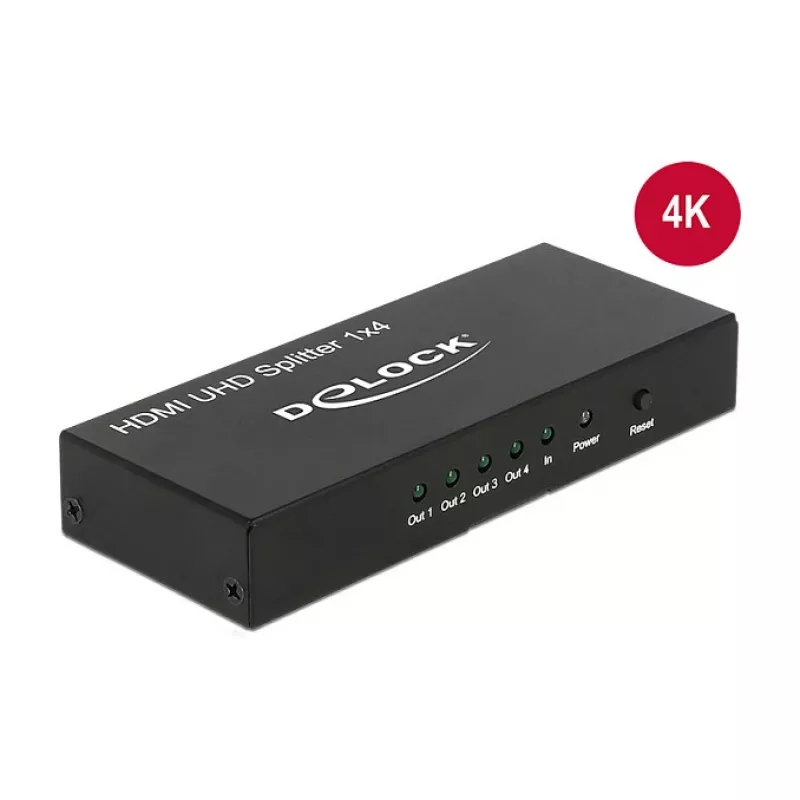
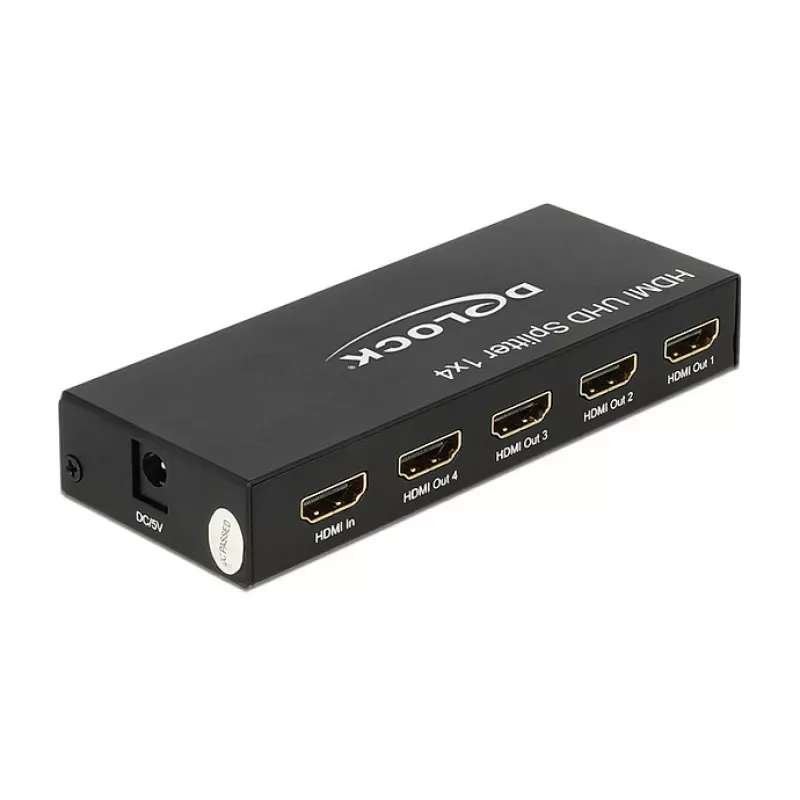
The DeLOCK 18684 HDMI video splitter receives a single HDMI signal from a PC or laptop and duplicates it to up to four HDMI displays. It supports a maximum resolution of 3840 x 2160 pixels and comes in a compact metal housing with dimensions of 123 x 51 x 20 mm. The unit accepts AC input voltage 100... Περισσότερα
Απόθεμα 100 Κωδικός 1394066 Μάρκα DELOCK Μοντέλο 18684 Εγγύηση 2 χρόνια

Αποστολή & επιστροφές

Εκτιμώμενη παράδοση Τρίτη, Οκτωβρίου 27
Θα ενημερώνεστε μέσω του αναλυτικού μας συστήματος παρακολούθησης
Τρόποι πληρωμής
Τραπεζική κάρταVisaMastercardPayPalApple PayGoogle PayΤραπεζική κατάθεση

The DeLOCK 18684 HDMI video splitter receives a single HDMI signal from a PC or laptop and duplicates it to up to four HDMI displays. It supports a maximum resolution of 3840 x 2160 pixels and comes in a compact metal housing with dimensions of 123 x 51 x 20 mm. The unit accepts AC input voltage 100–240 V at 50–60 Hz and is finished in black.

Advantages

The splitter provides four identical HDMI outputs from a single source without requiring software configuration. Its metal enclosure offers mechanical durability and helps with heat dissipation. Compact size and standard AC input make it suitable for various setups where multiple HDMI monitors are needed.

Suitable for

  • Digital signage and information displays
  • Presentations in meeting rooms or classrooms
  • Multi-monitor display walls showing identical content
  • Retail and exhibition installations

Key specifications

  • Model: DeLOCK 18684
  • Video port type: HDMI
  • Number of outputs: 4
  • Maximum resolution: 3840 x 2160 pixels
  • Input voltage: AC 100–240 V, 50–60 Hz
  • Housing: metal, colour: black
  • Dimensions: 123 x 51 x 20 mm

How to use

Connect an HDMI source (PC, laptop or other HDMI output) to the splitter's input. Use HDMI cables to connect up to four displays to the splitter outputs. Plug the AC adapter into a suitable mains outlet (100–240 V, 50–60 Hz). Power on the source and displays; the splitter will duplicate the source image to all connected monitors at the supported resolution.

Recommendations

Use high-quality HDMI cables and ensure all displays support the intended resolution. For long cable runs or higher refresh rates, check cable specifications to maintain signal integrity.
Κύρια σημεία
  • Digital signage and information displays
  • Presentations in meeting rooms or classrooms
  • Multi-monitor display walls showing identical content
  • Retail and exhibition installations
  • Model: DeLOCK 18684
  • Video port type: HDMI
  • Number of outputs: 4
  • Maximum resolution: 3840 x 2160 pixels
  • Input voltage: AC 100–240 V, 50–60 Hz
  • Housing: metal, colour: black
  • Dimensions: 123 x 51 x 20 mm
Χαρακτηριστικά
3D
Yes
Full HD
Yes
HD-Ready
Yes
HDCP
Yes
Αριθμός θυρών βίντεο
4
Διαστάσεις (ΠxΥxΒ)
123 x 51 x 20
Εγχειρίδιο
Yes
Ενδεικτικές λυχνίες LED
Y
Έξοδος βίντεο
4x HDMI
Κατανάλωση ισχύος (τυπική)
2.4 W
Κωδικός Εναρμονισμένου Συστήματος (HS)
85176990
Μέγιστη ανάλυση
3840 x 2160
Πλάτος ταινίας
600 MHz
Ρεύμα εισόδου
0.3
Ρεύμα εξόδου
1 A
Συχνότητα εισόδου AC
50 - 60
Τάση εισόδου AC
100-240
Τάση εξόδου
5
Τύπος θύρας βίντεο
HDMI
Τύπος συσκευασίας
Box
Υλικό περιβλήματος
Metal
Υποδοχή εισόδου DC
Yes
Υποστηριζόμενες αναλύσεις γραφικών
3840 x 2160
Υποστηριζόμενες λειτουργίες βίντεο
2160p
Χρώμα προϊόντος
Black
Ιστορικό τιμών τους τελευταίους 6 μήνες
Διαχωριστής βίντεο HDMI DeLOCK 18684
Τρέχουσα
76,90 €
Χαμηλότερη
75,85 €
Υψηλότερη
85,58 €
Μεταβολή 24 ωρών
+0,65 €   +1%
Εβδομάδα
+0,00 €   +0%
Μήνας
-4,98 €   -6%

Δημοφιλή προϊόντα σε αυτή την κατηγορία

Γεια σας, είμαι ο βοηθός AI του DistriNode. Μπορώ να σας βοηθήσω να βρείτε προϊόντα, να συγκρίνετε επιλογές, να δημιουργήσετε PDF προσφορών ή να ανοίξετε αιτήματα υποστήριξης.